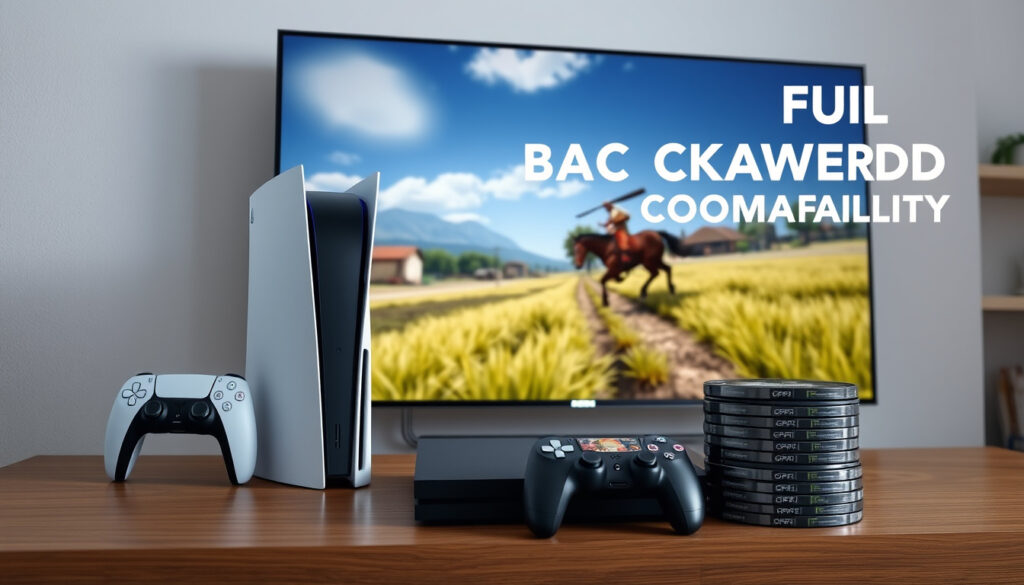
Can You Play PS4 Games on PS5? Full Compatibility Guide
Sony built the PS5 to play nearly every PS4 game you own—but the console model you choose determines whether disc-based titles actually work. More than 99% of the 4,000+ PS4 library runs on PS5 hardware with no extra steps required.
Playable PS4 Games: 99% of 4,000+ · PS5 Game Boost Benefit: Select PS4 titles · Disc Compatibility: Standard PS5 only · Digital Edition Limit: No disc drive · Non-Compatible Games: Rare exceptions
Quick snapshot
- 99% of PS4 games are playable on PS5 (PlayStation Blog official announcement)
- Digital Edition cannot play disc-based PS4 games (PlayStation Official Support documentation)
- Exact end-of-support date for PS4 functionality on PS5 (PlayStation Official Support documentation)
- Whether Sony will expand the incompatible-games list over time (PlayStation Official Support documentation)
- Sony announced 99% compatibility on October 9, 2020 (PlayStation Blog official announcement)
- PS5 launched November 12, 2020 with backward compatibility active (PlayStation Blog official announcement)
- PS5 Pro, Slim, and standard models all maintain PS4 disc compatibility (Linus Tech Tips community verification)
- Game Boost enhances select PS4 titles on PS5 hardware (Linus Tech Tips community verification)
These specifications cover the core compatibility parameters Sony confirmed at launch and continues to maintain.
| Specification | Detail |
|---|---|
| PS4 Games Supported | 99% of 4,000+ |
| Disc Drive Required | Standard PS5 models |
| PS3 Support | No backward compatibility |
| Upgrade Path | Free for eligible titles |
| PS4 Disc on Digital Edition | Not supported |
| Game Boost | Select PS4 titles |
Can I use PS5 for PS4 games?
Yes. Sony designed the PS5 from the ground up to play PS4 titles, and it delivers on that promise for the overwhelming majority of the catalog. More than 99% of the 4,000+ PS4 games are playable on PS5 consoles, according to official Sony documentation (PlayStation Blog official announcement). Both disc-based and digital PS4 games work on standard PS5 models.
Backward compatibility details
The PS5 reads PS4 game discs and downloads any available updates before launching. For digital games, you can install directly from the PlayStation Store or transfer your library from a PS4 via WiFi or USB extended storage (PlayStation Official Support documentation). Once installed, games launch and run from the PS5’s internal SSD.
Game Boost features
Some PS4 titles receive a performance boost on PS5 hardware, running at higher frame rates or with faster load times thanks to the newer processor and SSD architecture. The Gaming Publication GameSpot notes that “the PS5 is backwards compatible with most PS4 games and can even offer a mixture of improved load times, enhanced visuals, and better frame rates” (GameSpot gaming publication review). Not every game gets this boost, but the ones that do often show noticeable improvements.
Your PS4 library is largely safe on PS5. The odds of your favorite game being in the incompatible minority are slim—only a handful of titles have confirmed issues.
Which PS4 games do not work on PS5?
A small number of PS4 titles fail to run on PS5 hardware, though the exact list has shifted since launch. The Gaming Publication GameSpot documented the initial incompatible set, which includes Assassin’s Creed Syndicate, the Chronicles series (India, China, Russia), Risk, Star Trek Bridge Crew, and Werewolves Within (GameSpot gaming publication review). Additional titles like Afro Samurai 2: Revenge of Kuma Volume One, TT Isle of Man – Ride on the Edge 2, Robinson: The Journey, and Just Deal With It! also appear on incompatible lists maintained by the Gaming Publication GameSpot.
Known exceptions list
The complete list of non-compatible games numbers around 10 to 18 titles total, according to gaming accessory manufacturer Nacon Gaming (Nacon Gaming manufacturer blog). PlayStation marks these games as “Playable on: PS4 only” in the PlayStation Store, which is the fastest way to check before purchasing. The official PlayStation support page maintains an updated list of games that may show errors or unexpected behavior on PS5 despite otherwise falling within compatibility (PlayStation Official Support documentation).
Nacon titles check
Peripheral manufacturer Nacon confirms that its own titles, along with several others from niche developers, fall into the incompatible category. The implication: if you own a PS4 game that wasn’t widely popular, it pays to verify compatibility before relying on it.
Before selling or discarding your PS4, check whether your game library contains any titles from the incompatible list. Physical discs for these games won’t work on PS5.
Which PS5 console can play PS4 games?
All PS5 models play PS4 games—the distinction is purely about how you access them. Standard PS5 consoles with disc drives accept physical PS4 discs, while the PS5 Digital Edition requires digital downloads only. Both the Slim and Pro variants follow the same backward compatibility rules as the original standard PS5, according to PlayStation Official Support (PlayStation Official Support documentation).
Standard vs Digital Edition
The PS5 Digital Edition sacrifices the disc drive entirely, which means it cannot read PS4 game discs. PlayStation Official Support is unambiguous: “PS4 game discs can’t be used with the PlayStation 5 Digital Edition” (PlayStation Official Support documentation). If you have a large collection of PS4 discs, this is the decisive factor between models.
Slim and Pro models
The PS5 Slim offers the same backward compatibility as the original standard PS5, with disc drive present on applicable models. Community discussions on tech enthusiast forum Linus Tech Tips confirm that “PS5 Pro is backwards compatible with PS4 discs, similar to standard PS5” (Linus Tech Tips community verification). Both support digital PS4 games through the PlayStation Store, and both can use Game Boost for compatible titles.
Your PS5 model is a hard constraint, not a preference. The Digital Edition cannot retroactively gain disc drive functionality—choose the standard model if you have physical PS4 games.
What happens if I put a PS4 disc into a PS5?
Inserting a PS4 disc into a PS5 with a disc drive triggers an automatic installation process. The console reads the disc, installs the game data to internal storage, and prompts you to keep the disc inserted during gameplay as a licensing verification measure. This process works identically for PS5 Slim, Pro, and standard models that include the disc drive.
Insertion process
The PlayStation Official Support page outlines the straightforward steps: insert the disc, wait for any required updates to download, then launch the game (PlayStation Official Support documentation). The disc must remain in the drive during play to verify ownership. After installation, you won’t need the disc inserted for every session—only periodically for verification.
Digital Edition workaround
The PS5 Digital Edition offers no workaround for physical discs. If you’ve already committed to the Digital Edition and own PS4 discs, your options are limited: purchase digital copies from the PlayStation Store, transfer games from a PS4 if you still have one, or borrow a friend’s disc-drive PS5 temporarily.
How to upgrade an eligible PS4 game to the digital PS5 version
Some PS4 titles offer free or discounted upgrades to their PS5 digital counterparts. Sony and individual publishers have offered these upgrades selectively, typically for games that received substantial PS5 remasters or enhancements. For those interested in the enhanced experience, you can learn more about Red Dead Redemption 2 на PS5. Red Dead Redemption 2 на PS5
Eligibility check
Not every PS4 game qualifies for an upgrade. Look for the PS5 version listed in the PlayStation Store while viewing a PS4 title—if a “Upgrade” option appears, the path is available. Games without this option don’t have a PS5 upgrade path, though they likely run fine in backward compatibility mode.
Upgrade steps
Navigate to your game library in the PlayStation Store, locate the PS4 title, and check for the PS5 version. If eligible, select the upgrade and follow prompts to download the enhanced edition. The PlayStation Blog confirmed that the gaming experience on PS5 Digital Edition matches the disc version for digital PS4 games, making the upgrade path equally valid across models (PlayStation Blog official announcement).
This model-by-model breakdown shows exactly where each PS5 variant stands on disc playback, digital access, and performance enhancement.
| Model | PS4 Disc Support | Digital PS4 Support | Game Boost |
|---|---|---|---|
| PS5 Standard | Yes | Yes | Select titles |
| PS5 Digital Edition | No | Yes | Select titles |
| PS5 Slim | Yes (disc model) | Yes | Select titles |
| PS5 Pro | Yes | Yes | Enhanced |
The table confirms that disc-based PS4 access requires the standard, Slim with disc drive, or Pro model—but all four variants handle digital PS4 games equally.
How to play PS4 disc games on PS5
Playing a PS4 disc on a PS5 requires only three steps and works on any PS5 model with a disc drive. First, insert the PS4 disc into the console. Second, wait for the game to install—this may include mandatory updates that download automatically. Third, keep the disc in the drive and launch the game.
- Insert the PS4 disc into the PS5 disc drive
- Allow the console to install the game and any available patches
- Keep the disc inserted for licensing verification
- Launch the game and enjoy improved load times where applicable
The DUALSHOCK 4 controller works with PS4 games on PS5, according to PlayStation Official Support, so you don’t need to purchase new hardware just to replay your older titles (PlayStation Official Support documentation). Specialty peripherals like racing wheels also function with supported PS4 games on PS5.
“We’re pleased that more than 99% of PS4 games will be playable on PS5 on day one.” — Sony Official Announcement (PlayStation Blog official announcement)
“The PS5 is backwards compatible with most PS4 games and can even offer a mixture of improved load times, enhanced visuals, and better frame rates.” — Gaming Publication GameSpot (GameSpot gaming publication review)
Related reading: Nintendo Switch 2 Controllers · When is the Minecraft Movie Coming Out
youtube.com, youtube.com, eu.aimcontrollers.com, psntools.com
Titles like Red Dead Redemption 2 showcase PS5’s strong backward compatibility with PS4 discs, delivering stable 30 FPS and Game Boost enhancements as outlined in RDR2 PS5 performance analysis.
Frequently asked questions
Can you play PS3 games on PS5?
No. The PS5 does not support PS3 discs or PS4 digital games requiring PS3 disc authentication, according to PlayStation Official Support (PlayStation Official Support documentation). Backward compatibility is limited to PS4 titles only.
Can you play PS4 disc games on PS5 Slim?
Yes, the PS5 Slim with a disc drive plays PS4 discs identically to the original PS5 standard model, according to PlayStation Official Support (PlayStation Official Support documentation). The Digital Slim variant does not have a disc drive and cannot play physical discs.
How to play PS4 disc games on PS5 digital?
You cannot play PS4 disc games on the PS5 Digital Edition. Your options are purchasing digital copies from the PlayStation Store, transferring from a PS4 via WiFi or USB extended storage per PlayStation Official Support (PlayStation Official Support documentation), or using a different console.
Will the PS5 last for 7 years?
Sony has not announced an end date for PS5 support or PS4 backward compatibility. The PlayStation 4 received support for roughly seven years before the PS5 launch, and Sony maintains its compatibility list on an ongoing basis per PlayStation Official Support (PlayStation Official Support documentation).
How long until PS4 is no longer supported?
Sony has not disclosed a specific timeline for ending PS4 support on PS5. As of now, the backward compatibility list remains active and updated, and no official end-of-life date has been announced for the feature.
Can you play PS4 games on PS5 for free?
If you already own PS4 games on disc or digitally, you can play them on PS5 at no additional cost. The backward compatibility feature is built into every PS5 model. Some publishers offer free upgrades from PS4 to PS5 versions for select titles, but this varies by game.
More related posts
 Tim Burton Biography: Relationships, Movies and Latest News
 GPS Tracker Guide: Best Options, No Monthly Fee, Ireland
 Aer Lingus Business Class – Complete 2025 Guide and Review
 Denise Gough Movies and TV Shows: Full Credits List
 Octopus Energy Ofgem Compensation – Full Guide to Claiming
 Sebastian Stan: Biography, Net Worth, and Relationships
 Amy Childs: Children, Weight Loss, Net Worth, Partner & More
 Stronger With You Intensely: Emporio Armani Men’s Eau de Parfum